
Our Music's Just Good Business
$26.95/mo. See Subscription Offer Details.
CALL US AT 866-345-7474

Now Available: Audio Messaging!
Insert important messages into your playlist using our secure online portal.

Low Monthly Fee – An excellent value for enhancing your customer, client, and employee experience. Starting at $26.95/mo. See Offer Details.

No Long-Term Contracts – Flexibility to stop service without penalty, unlike other commercial music services that require multi-year commitments.

Exclusive Business Channels – 240+ channels with exclusive business content, plus the ability to create Pandora stations based on your favorite artists.

Fully Licensed Music – All required royalty fees—including ASCAP, BMI, and SESAC—covered and paid by us as part of your business subscription.

Easy Installation - Multiple "easy access" listening options, from apps to hardware players, designed for easy installation and set-up

Music Scheduling and Messaging - Manage music scheduling and day-parting as well as audio messaging for single or multiple locations via remote online portal.

The Sound of Success Just Got Better
Now with 240+ business-friendly channels spanning more than a dozen genres, SiriusXM Music for Business is a great fit for every restaurant, office, and retail outlet. Plus, you have a choice between Streaming or Satellite service. Let our music work—and rock—for you.
Streaming Service
Using your high-speed internet connection, these streaming radio solutions offer access to 240+ channels with exclusive business content, plus Pandora Artist Radio. With SiriusXM Music for Business, there’s more music for you and your customers.
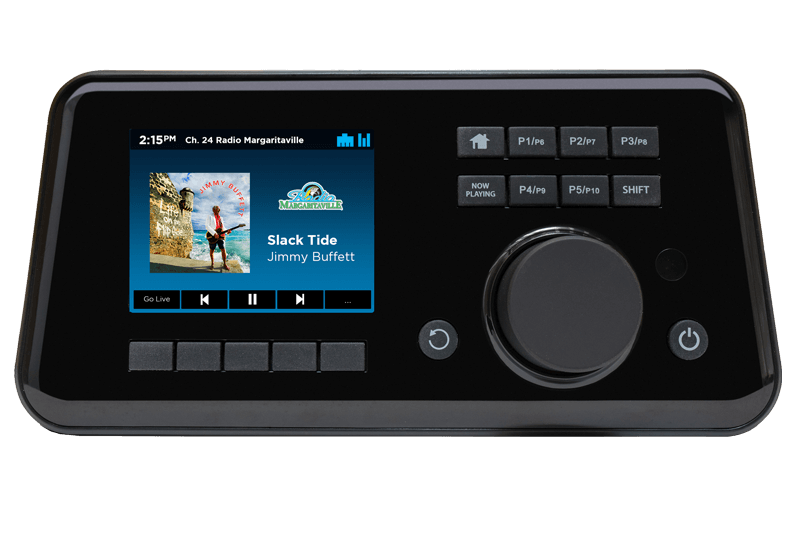
BR3 Business Streaming Player
This streaming radio offers quick and easy setup for your business or office with no computer required. Use the color screen display, control knob, and buttons to change channels, access radio features, and control your music experience directly from the player itself. Includes remote scheduling and dayparting as well as audio messaging capabilities via the SiriusXM central portal.
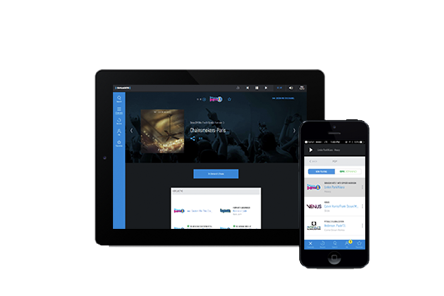
SiriusXM Music for Business App
Stream fully licensed business music via a smartphone, tablet, or computer. Just sign up, download the app, and start rocking your business in minutes—no special hardware required.
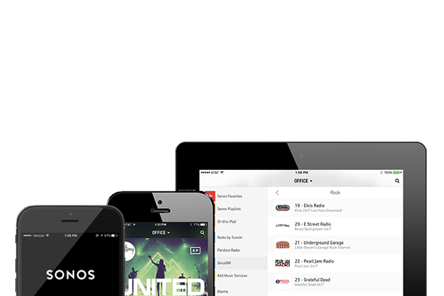
Sonos SiriusXM Music for Business
Add SiriusXM to your Sonos App and get high-fidelity sound without running a single wire. Choose the music—and volume—you want to play in the lobby, breakroom, or any other area of your business.
Satellite Service
Don’t have access to a high-speed internet connection? Our satellite service programming includes 70+ ad-free music channels and is available in all states except Alaska and Hawaii. It’s easy to install and can be used just about anywhere.
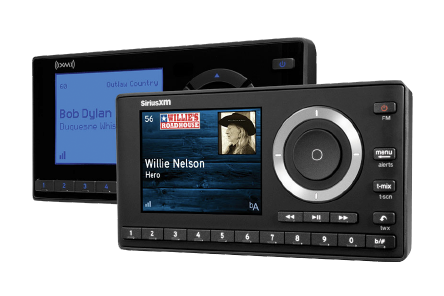
Home Dock & Play Radio
This satellite radio has a user-friendly display and lets you browse what’s playing on other channels while listening to the current one. It stores up to 20 presets and allows you to easily lock and unlock channels with mature content. Optional professional installation is available through our authorized partners.
For Every Mood

Restaurants, Bars & Breweries
The music you choose can set the mood for an enjoyable dining experience or a fun conversational cocktail with friends. SiriusXM offers the variety you need to complement any menu.

Retail & Convenience Stores
SiriusXM Music for Business can turn an ordinary errand into a pleasure—and potentially tip the scale between window shopping and making a sale. Our service also enables overhead audio messages so you can highlight important new deals, products, or other announcements.

Banking
The sound-masking created by background music helps to keep customer conversations private as well as providing entertainment that reduces perceived wait times during busy periods.

Healthcare
A quiet waiting room gives patients nothing to focus on but time. The right music can be a welcome and enjoyable distraction, or a great motivator for physical therapy.

Fitness & Spa
Staying fit and healthy is what it’s all about. Music can set an upbeat tempo for members to push through one more set at the gym, or a soothing tone for patrons to spend a relaxing day at the spa.

On Hold Music
Being on hold is no one’s idea of fun—but hearing music you love, or something that makes you smile, can make customers feel a lot better about waiting. You can also take advantage of this time to play audio messages specific to your business.
Franchise Music Solutions
Creating a consistent, musical experience for your franchises helps your customers get to know, understand, and love your brand.

Franchise the Perfect Groove
The benefits of SiriusXM Music for Business include enterprise management to centrally control a group of players via the web, custom music and messaging, sound system packages and installations, competitive national account pricing, and restricted employee access to radio features and channels. Plus there’s a custom website for ordering program products and services. You can also play audio messages specific to your business.
Note: Features may vary by radio and subscription plan.
Learn More From the Experts

Visit one of our Authorized Resellers

Join Our Dealer Commision Program
*The free SiriusXM Music for Business trial is for commercial business use only, and not for consumer audio, in-vehicle, or fleet subscriptions.
FREQUENTLY ASKED QUESTIONS
There’s an important difference between SiriusXM’s consumer service and our commercial service. Only SiriusXM Music for Business meets the needs of business. It includes the required payments of ...
Both our satellite and streaming services offer great ad-free music. However, with the streaming service, 30 of the music channels are uninterrupted (no hosts, DJs, etc.). Streaming subscribers also...
Absolutely. For satellite, you’ll need to make sure the SiriusXM antenna supplied with your radio is mounted outside with a clear view to the sky. To access our streaming service, you have three...
All dedicated Music for Business players have the ability to block, password-protect, or hide channels you prefer not to play. Please refer to your radio manual for instructions. You can also block channels via devices that support our online management portal.
Our desktop and online web players use state-of-the-art technology to automatically reconnect when there is latency in your internet connection. There still may be an occasional disconnect, in which...
You can add up to 25 channels to your Favorites on the Music for Business Web Player....
Free Trial Offer Details: By registering for a free 30-day Streaming trial, SiriusXM may contact you by email regarding special offers from time to time. You may always change your Privacy Preferences with us. If you decide to continue service after your trial, the subscription plan you choose will automatically renew and you will be charged according to your chosen payment method at then-current rates. Fees and taxes apply. To cancel you must call us at 1-866-345-7474 . See our Customer Agreement for Business Establishment Service and Privacy Policy for complete terms at www.siriusxm.com . All fees and programming subject to change. This offer is available only in USA to those providing valid contact information.
Subscription Offer Details: The Music for Business subscription plan you choose will automatically renew thereafter and you will be charged according to your chosen payment method at then-current rates. Fees and taxes apply. To cancel you must contact your Reseller. (For questions, call 1-866-345-7474.) See our Customer Agreement for Business Establishment Services for complete terms. All fees and programming subject to change.
Rebate Offer Details: View Rebate Offer Details. Purchase a new eligible receiver between January 1, 2023 and December 31, 2023, activate it with any SiriusXM Music For Business subscription by January 31, 2024 and MAINTAIN 90 DAYS OF CONTINUOUS PAID SERVICE to receive a $70 rebate. If activating the receiver with a free trial subscription, you must maintain 90-days of paid service after the trial period ends to qualify for the rebate. Fees and taxes apply. To be eligible, the subscription activated on the new receiver must be new and not transferred from a previous device or replace a current subscription on the account. The subscription plan you choose will automatically renew thereafter and you will be charged according to your chosen payment method at then-current rates. Please see our Customer Agreement at siriusxm.com/siriusxmforbusiness for complete terms. To cancel you must contact your subscription vendor. All fees, content and features are subject to change. Subscription and hardware sold separately. Visit siriusxm.com/siriusxmforbusiness (Offer Code: 23-88641) for complete rebate terms, a list of eligible receivers, and to submit your rebate claim online. All requests must be submitted by May 31, 2024. Limit: 1 rebate per receiver. Offer valid only for businesses in the 50 US and D.C. Void where prohibited.
still have questions?
contact us
The following information will be subject to the SiriusXM Music for BusinessPrivacy Policy